cat ~/notes/proxmox-ryzen-freeze.md
proxmox freezes on early ryzen: the fix that looked broken
[id]proxmox freezes on early ryzen: the fix that looked broken
My proxmox mini PC started freezing every few hours. The power light stayed on, but SSH, the web UI, and even ping stopped responding. Only a hard power cycle brought it back.
The previous boot contained no panic and no shutdown trail. The journal simply stopped in the middle of an ordinary line.
That pointed to a known early Ryzen C-state problem. I applied the standard kernel workaround, rebooted, and watched the box die again three and a half minutes later.
Except it had not frozen that time. That one bad observation sent the rest of the diagnosis in the wrong direction.
The machine
The host is a Lenovo m715q Tiny with a Ryzen 5 2400GE, the Raven Ridge generation, and 30 GB of RAM. It runs proxmox headlessly with one VM for zigbee2mqtt and a Sonoff Zigbee USB dongle passed through to the guest.
It had been stable for months before the freezes started.
Reading a crash with no crash log
When the kernel wedges completely, there is nothing useful to inspect while it is happening. The only evidence is the journal from the previous boot.
I started with the boot history:
journalctl --list-bootsThen I checked how the previous boot ended:
journalctl -b -1 -n 10 --no-pagerA clean shutdown ends with systemd-shutdown, reboot:, or another orderly sequence.
The affected boots ended abruptly on unrelated log lines.
That proves the machine did not shut down cleanly. It does not prove why. A kernel freeze and a power cut leave the same truncated journal.
I missed that distinction at first.
First suspect: deep C-states
Early Ryzen systems are known to freeze when the CPU enters a deep idle state and fails to wake up. The external behavior matches this host exactly: power remains on, the system stops responding, and no final error reaches disk.
The common workaround limits the deepest idle state.
This machine boots through grub with its root filesystem on LVM, so I changed /etc/default/grub:
GRUB_CMDLINE_LINUX_DEFAULT="quiet processor.max_cstate=1 idle=nomwait"Then I regenerated the grub configuration:
update-grubAfter rebooting, /proc/cmdline confirmed that both parameters were active:
cat /proc/cmdline
# ...quiet processor.max_cstate=1 idle=nomwait
Three and a half minutes later, the machine lost power. The new journal ended abruptly, just like the earlier freezes.
I treated that event as proof that the workaround had failed. It was not.
The last log line was not the cause
Once I ruled out C-states, the logs offered an obvious suspect. Every failed boot ended near this message:
VM 100 qga command failed - guest-ping timeoutThe Zigbee VM looked guilty.
Proxmox emitted that message every few seconds because the guest agent was not running. When a machine stops at a random time, the most frequent log line has the highest chance of appearing last.
It was a sampling artifact, not a causal signal.
The other checks were equally quiet:
- the VM used USB passthrough, not PCI or GPU passthrough
- the USB reset matched the guest taking ownership of the dongle
- no
amdgpuhang appeared in any boot - there were no OOM, MCE, EDAC, or ZFS errors
- only 6 GB of 30 GB RAM was in use
Nothing supported a guest, GPU, memory pressure, or storage failure.
A convincing trend built from bad data
The uptime before each event looked worse every time:
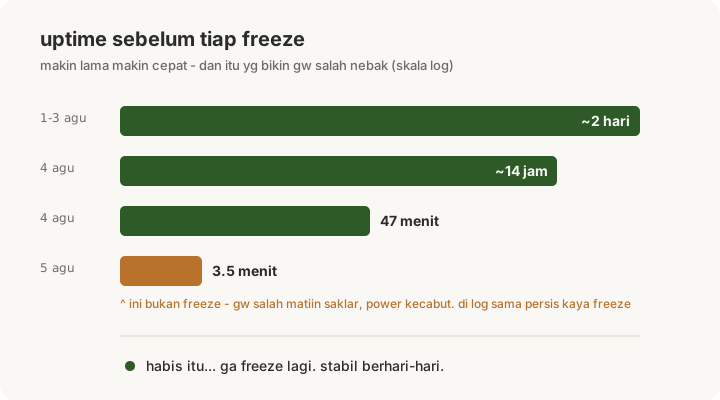
2 days -> 14 hours -> 47 minutes -> 3.5 minutesThat accelerating sequence suggested hardware degradation. The host had mismatched 16 GB Samsung and Hynix DIMMs, non-ECC, running at 1333 MHz. Thermals, RAM, and power delivery all became plausible next steps.
Before opening the box, I enabled its hardware watchdog at /dev/watchdog0 so a future kernel wedge would reboot automatically.
Then I left it running overnight.
It stayed up the next day. Then the next. The freezes did not return.
The C-state workaround had been effective from its first reboot.
The three-and-a-half-minute event was a power cut. I had flipped the wrong switch on the power strip myself.
Because journald could not distinguish that from a hard freeze, I added the event to the timeline as if it were another failure. One false point made a stable fix look broken and turned a random sequence into a convincing hardware trend.
What the evidence can actually prove
A truncated journal proves an unclean stop. It cannot separate a frozen kernel from lost power.
The final log message tells you what was written last. It does not tell you what caused the host to stop.
A shorter failure interval can support a hardware hypothesis, but only if every point describes the same event. Mine did not.
For an early Ryzen host that freezes without logs, processor.max_cstate=1 idle=nomwait is still a useful first test.
Confirm the parameters in /proc/cmdline, then evaluate only verified freezes after that reboot.
The workaround fixed this host immediately. The evidence looked otherwise because I had mislabeled a power cut as a failure.